
What an Expert Advisor actually is

In MetaTrader, an automated program is called an Expert Advisor. The name sounds like a man in a suit who knows something you do not. It is not that. It is a set of rules a computer follows without arguing, and everything else in this module comes back to that one sentence.
A set of rules, written down
An Expert Advisor is a small program that runs inside MetaTrader 5. You attach it to one chart, on one symbol and one timeframe, and from that moment it watches every price update and does exactly what its rules say, in the order they were written.
However complicated the sales page, every Expert Advisor is three answers: when to open a trade, how big, and how to get out. A plan that cannot answer all three in a form a machine can read cannot be automated at all.
- The entry: something measurable, such as the 50 period moving average crossing the 200 period one on the close of an H1 candle.
- The size: a formula worked back from the stop distance, such as risking 1 percent of the balance, as in position sizing and the one percent rule.
- The exit: a stop loss, a target, a time of day, or a rule that closes the trade when the opposite condition appears.
Notice what is missing. No line for judgment, no line for how the market feels today, no line for whether you slept. The program has only what somebody typed.
Trading carries risk and you can lose money.
Where it sits in MT5
Press Ctrl+N to open the Navigator panel and find the Expert Advisors folder. Drag one onto a chart and MT5 opens a dialog with a Common tab and an Inputs tab. Inputs is the list of settings the author left you: lot size, stop distance, moving average lengths, trading hours. Common carries the permission to trade at all.
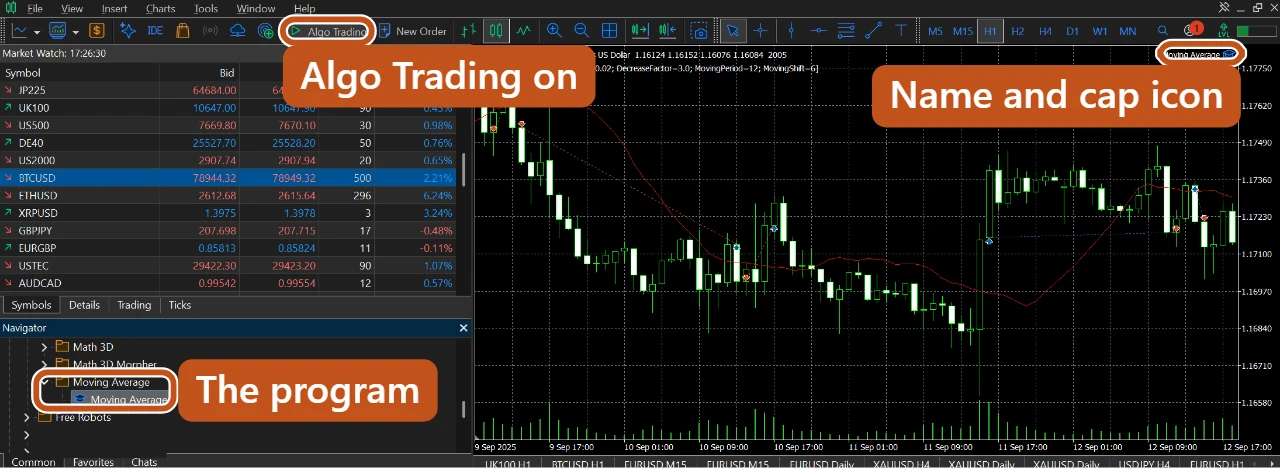
Two switches decide whether anything happens. The Algo Trading button in the toolbar is the master switch for the whole terminal, and Allow Algo Trading on the program's Common tab is its own permission. While a program is attached, its name and a small cap icon sit in the chart's top right corner. A program can be attached, configured correctly and completely inert because one of those switches is off.
What the name suggests, and what is actually running
| What the name suggests | What is actually running |
|---|---|
| An expert | A list of conditions somebody typed. It knows nothing outside them. |
| An advisor | It offers no opinion. It acts, or it does nothing. |
| Artificial intelligence | Almost none of them learn. The rules stay fixed until a human edits them. |
| A prediction machine | It reacts to prices that have already printed. Nothing predicts the next one. |
That does not make it useless. It makes an Expert Advisor exactly as good as the thinking behind it.
One word about names in this course
In MetaTrader, any automated program is an Expert Advisor, and this module uses the term that way: the generic name for anybody's program. HustlCraft's own programs do a different job, so this course calls them the software, or by their names: HustlCraft Shield, Prop Firm Guardian, Wingman and BattleMap. Lesson nine explains why the difference is more than wording.
Part One covered when the software helps and when it does not, in when to use the software, and when not to. This module widens that to any automated program you may be shown or sold.
The picture to keep
An Expert Advisor is a very obedient driver. Hand him a route and he drives it perfectly, every single day, without getting tired or distracted.