
Common error messages and what they actually mean

When MT5 refuses an order it tells you why, in two or three words, and most people close the box without reading them. Each message points at one specific thing you typed. Learn them and you stop guessing.
Where the message appears
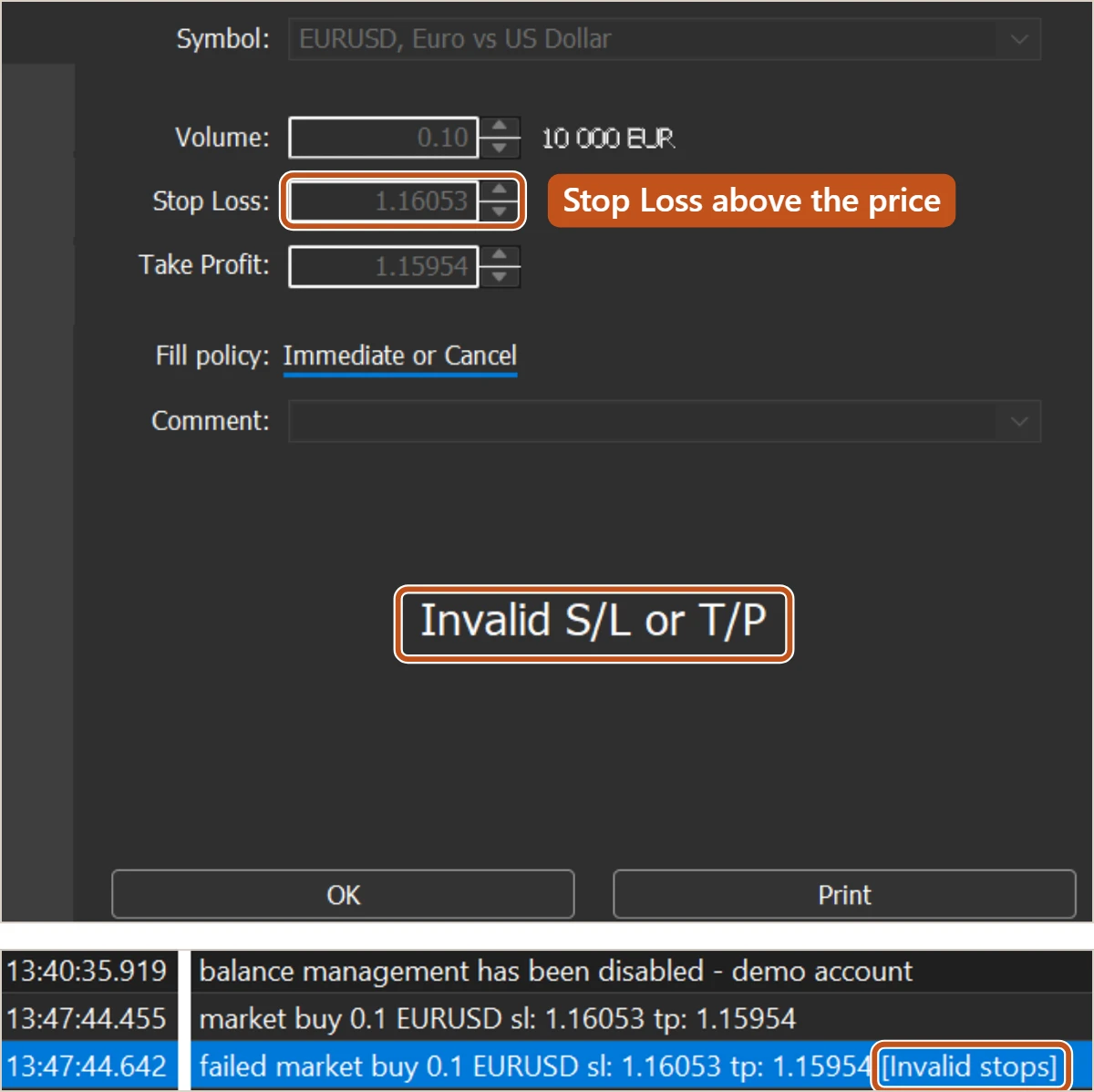
A refused order shows its reason in two places. First, inside the New Order window itself: the fields grey out, the price in the middle of the window is replaced by the reason, and the two buttons become OK and Print. Second, in the Toolbox Journal tab: a line with a time stamp for the request you sent, then a line beginning failed with the server's reason in square brackets. If software sent the order, the Experts tab carries the same line.
The two places can word the same refusal differently, as the picture shows. The Journal is the one to trust, because it keeps the history. If you are not sure what happened three tickets ago, it is written there.
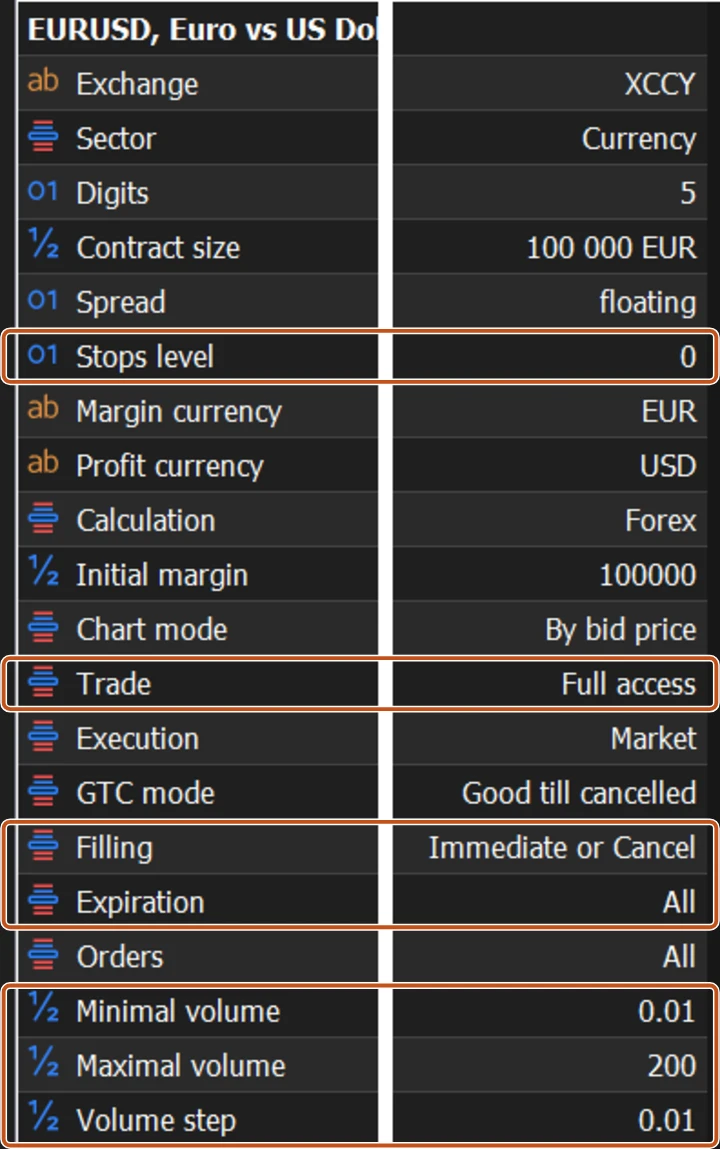
Most refusals trace back to a handful of lines in the Specification window, opened from Market Watch by right-clicking the symbol.
The messages, one by one
| Message | What it actually means | What to check |
|---|---|---|
| Invalid stops | Your Stop Loss or Take Profit is on the wrong side of the entry, or closer than the broker's Stops level | The side (buy: stop below, target above), the digits, and the Stops level in Specification |
| Not enough money | Free margin is less than the margin this volume needs | Volume. Look at Free margin in the Trade tab. Smaller size, or no trade |
| Market closed | The symbol is not trading now: weekend, outside its session hours, or a holiday | The Sessions line in Specification and the server time in Market Watch |
| Off quotes | The broker has no price to fill you at this moment, often in thin hours or during a release | Wait. Do not widen Deviation or resend blindly. The market is telling you it is not ready |
| Requote | Instant execution only: price moved before your order landed, and the broker offers a new price | Accept or refuse the new price. Several in a row means the market is fast; close the ticket |
| Invalid volume | Volume is below the minimum, above the maximum, or not a multiple of the step | The Minimal volume, Maximal volume and Volume step lines in Specification. 0.015 fails when the step is 0.01 |
| Trade disabled | Trading is switched off for this symbol or this account | The Trade line in Specification (Full access, Long only, Short only, Close only, Disabled). An investor password is read-only |
| Invalid price | A pending order's Price is on the wrong side for its type, inside the Stops level, or in the wrong digits | Buy Limit below the Ask, Buy Stop above it, and the mirror for sells. Lessons 3 to 5 |
| Order is locked | The server is still processing a request for this order, usually because a click was sent twice | Wait a few seconds and look at the Trade tab. Do not send it again |
| Position would exceed the limit | The broker caps how much volume or how many positions this symbol or account may hold, and this order would pass it | The account's limits with the broker. Reduce the size or close something first |
Reading the three that cost money
Not enough money is the one that tempts people. The honest reading is that the position is too large for the account. The tempting reading is that the stop can go, since the stop is not what takes margin. Removing the stop does nothing to the margin, and now the order has no stop. Reduce the volume.
Off quotes and Requote are the market telling you it is moving faster than your order can travel. The slippage lesson put a price on entering at those moments. A message that stops you entering there is doing you a favour.
Order is locked is the double click. You pressed Buy by Market, nothing seemed to happen, you pressed it again. The first order is still in flight. Send the second and you may end up with two positions. Wait, then read the Trade tab.
Not enough money, worked through
- Your account shows Free margin of 150 dollars in the Trade tab. Leverage is 1:100.
- You try to buy 1.00 lot of EUR/USD at 1.08512. One lot is 100,000 euros, and at 1:100 the margin needed is about 1,085 dollars. The server replies Not enough money.
- At 0.10 lots the margin needed is about 108 dollars, which fits, but leaves under 42 dollars of free margin for the trade to move against you.
- The leverage lesson is the reason the right answer here is usually smaller still, or no trade at all.
The message was correct. The size was wrong for the account, and margin is only the first cost of getting it wrong.
Trading carries risk and you can lose money.
Three habits that stop most of them
- Read the Specification window once for every symbol you trade: Stops level, Minimal and Maximal volume, Volume step, Filling, Expiration, Trade, Sessions. Most messages in the table above are you bumping into a line you never read.
- Type Stop Loss and Take Profit as prices with the full number of digits, worked out from pips on paper first, as Lesson 8 showed.
- Send once. If nothing happens, read the Journal before touching the button again.

An error message is the platform protecting you from an order it cannot honour. Changing numbers at random until it accepts is how a stop ends up on the wrong side, or a volume ends up ten times what you meant. Read the words, fix the one thing they name, then send once.
The picture to keep
An error message is the shopkeeper handing your note back and pointing at the line he cannot do. Fix that line. Do not scribble a new number and shove the note back across the counter.