
Reading the order ticket properly

The ticket is a contract you write in ten seconds. Every box on it is a decision, and the platform will do exactly what the boxes say, not what you meant. Read it the way you would read a form before you sign it.
Two layouts, one window
Press F9 and the New Order window opens. Down the left is a list of order kinds: Market Execution, Limit Order, Stop Order and Stop Limit Order. The one you click decides which fields you see. Market Execution ends in two buttons, Sell by Market and Buy by Market. The three pending kinds add Price, Stop Limit price (open only for Stop Limit Order) and Expiration, and end in plain Sell and Buy buttons that stay grey until the numbers make sense for that direction. Everything else is shared.
Some brokers show Instant Execution where Market Execution sits. Older versions of MT5 use a Type drop-down instead of the list; the fields behind it are the same.
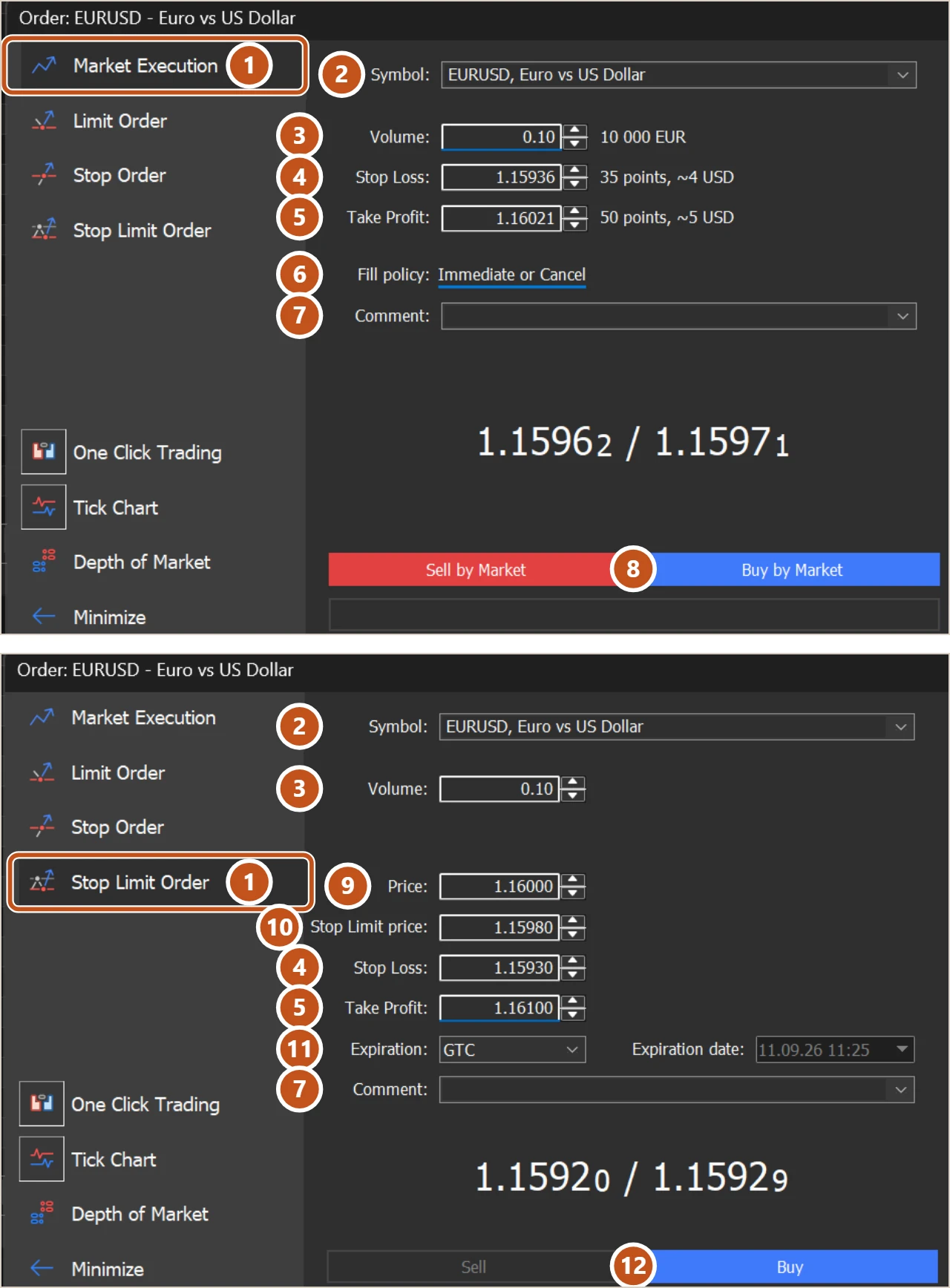
Every field, and the mistake that lives in it
| # | Field | What it is | The mistake to avoid |
|---|---|---|---|
| 1 | Order kind | Market Execution, Limit Order, Stop Order or Stop Limit Order, in the list on the left | Placing a market order when you meant to wait, or the reverse |
| 2 | Symbol | The instrument the order is for | Ticket opened from the wrong chart. Read it every time |
| 3 | Volume | Size in lots, in steps the broker sets, usually 0.01 | Typing a lot size from memory instead of from your risk |
| 4 | Stop Loss | A price, not a distance, that closes the trade at a loss | Typing pips into it, or putting it on the wrong side of the entry |
| 5 | Take Profit | A price that closes the trade at a gain | Leaving it blank when the plan has a target |
| 6 | Fill policy | Fill or Kill, Immediate or Cancel, or Return | Changing it to silence an error without reading the error |
| 7 | Comment | Short text that follows the trade into History | Nothing serious. Some brokers overwrite it, so do not rely on it |
| 8 | Sell by Market, Buy by Market | Send the market order at the Bid or the Ask | Clicking before reading the rest of the ticket |
| 9 | Price (pending only) | The level the pending order sits at | Wrong side of the current price for the kind chosen |
| 10 | Stop Limit price (stop limit only) | The limit placed once the trigger is touched | Putting it on the wrong side of the trigger |
| 11 | Expiration (pending only) | GTC, Today, Specified or Specified day | GTC by default, and an order alive over the weekend |
| 12 | Sell, Buy (pending only) | Send the pending order; only the button that fits the Price lights up | Reading a grey button as a fault instead of a wrong Price |
| Deviation (instant only) | Points of price movement you will accept without a requote | Setting it wide to avoid requotes and taking the slippage instead |
Stop Loss and Take Profit deserve one more line. The pips lesson explained that most brokers show five digits on a pair like EUR/USD, so a 30 pip stop is 0.00300 of price, not 0.00030. Get the digits wrong and the stop is either ten times too tight or ten times too wide, and MT5 will accept either without complaint as long as it is on the correct side.
The tick chart on the right
The right-hand part of the ticket, outside the pictures above, is a live tick chart with two lines, Bid and Ask. It is there so you can see the spread and the speed of the market in the two seconds before you click. If the lines are jumping or the gap between them has widened, the tag is not the price you will pay. Close the ticket and wait.
Turning pips into the prices the ticket wants
A 30 pip stop and a 60 pip target on a buy
- EUR/USD Ask is 1.08512. You are buying, so the entry is the Ask.
- 30 pips on a five-digit quote is 0.00300. Stop Loss for a buy sits below the entry: 1.08512 minus 0.00300 is 1.08212.
- 60 pips is 0.00600. Take Profit sits above: 1.08512 plus 0.00600 is 1.09112.
- Type 1.08212 into Stop Loss and 1.09112 into Take Profit. For a sell the arithmetic flips: entry at the Bid, stop above it, target below it.
- Check Volume against your risk. At 0.10 lots a pip on EUR/USD is worth about 1 dollar, so the 30 pip stop risks about 30 dollars. If that is more than your plan allows, the volume comes down, not the stop.
Two prices typed from arithmetic, not guessed, and a size that fits the stop rather than the other way round.
Trading carries risk and you can lose money.
A pre-click checklist
- Symbol matches the chart, and the account in the Navigator is the one you think it is.
- Volume was calculated from the stop distance and your risk, in this session, for this trade.
- Stop Loss is on the correct side of the entry, in the right digits, and further away than the broker's Stops level.
- Take Profit is where the plan says, or blank because the plan says so, not because you forgot.
- For a pending order: Price on the correct side for the type, and Expiration set on purpose.
- The tick chart is calm and the spread is normal.
After you click, open the Toolbox Trade tab and read the row. The S / L and T / P columns must show your numbers. If either is empty, double-click the row and fill it now. An order with no stop is not a decision you made, it is one you skipped.
The picture to keep
The ticket is the note you hand the shopkeeper, and he reads it exactly as written. If the note says five bags when you meant one, you are taking five bags home.