
Filling policies

Fill policy is the one field on the ticket almost nobody reads, and it decides what happens when the market cannot give you everything you asked for. Three settings, in plain words, and the reasons an order comes back rejected.
When the shop does not have enough
You leave the note: five bags at 1,480. The price drops, the shopkeeper calls, and he has three bags at that price. What happens now? You could take the three and forget the rest. You could take the three and ask him to keep the note open for two more. Or you could say all five or none. The fill policy is that answer, given in advance.
On MT5 the same thing happens when the volume available at a price is less than the volume you asked for. The order book lesson shows why a price only ever has so much behind it. Module 9 goes deeper. Here we only need the three answers.
The three policies
| Fill policy | In plain words | What happens to the rest |
|---|---|---|
| Fill or Kill | All of it now, at this price or better, or nothing | There is no rest. The whole order is cancelled |
| Immediate or Cancel | Give me what is there now, at this price or better | The unfilled part is cancelled |
| Return | Give me what is there now and keep the rest working | The unfilled part stays on the server as a live order |
Fill or Kill is the strict one. If the market cannot fill your whole volume, you get nothing, which is sometimes exactly what you want: a half-size position with a full-size stop is not the trade you planned.
Immediate or Cancel is the flexible one. You take what is available and let the rest go. A partial fill shows in the Trade tab at the volume that actually filled.
Return belongs mostly to exchange-traded markets such as futures and shares, where an order can rest in a central book. Many forex brokers do not offer it, and then it is simply not on the ticket.
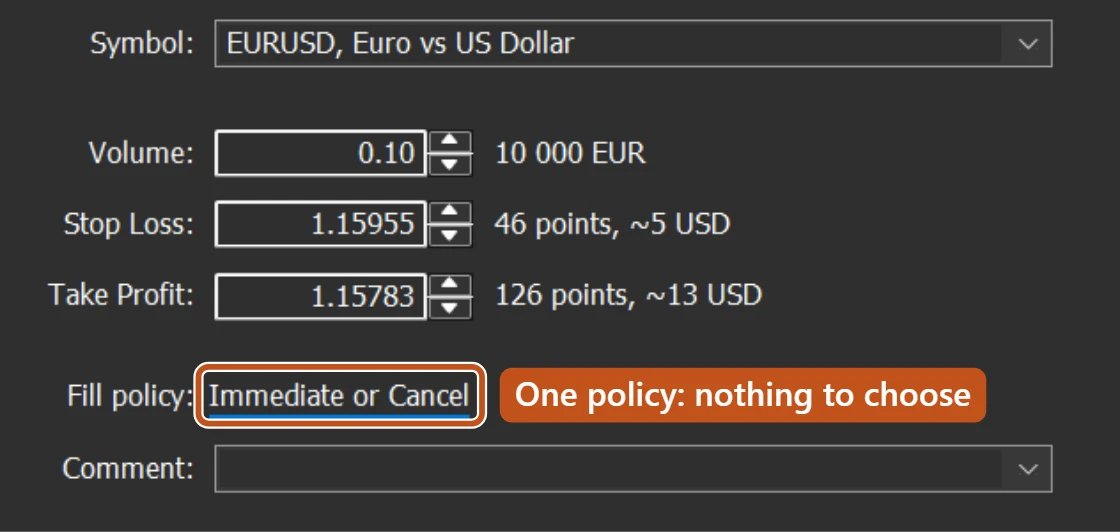
On the ticket, Fill policy is written as a link under Take Profit. When a symbol allows more than one policy, that is where you choose. On the demo account below it allows one, so there is nothing to choose.
Who decides which you can use
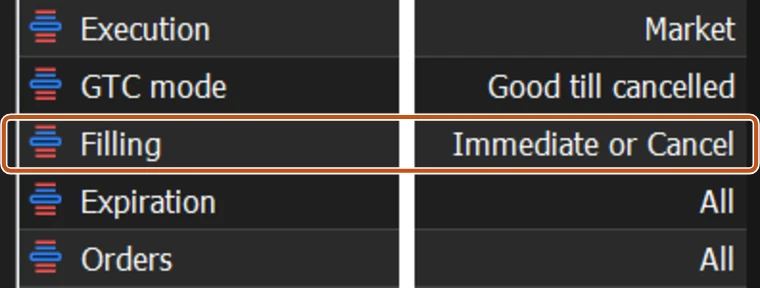
The broker does, per symbol. Open Specification from Market Watch and read the Filling line. If it names one policy, that is your only choice, and the ticket simply shows it. This is why the same ticket looks slightly different from one broker to the next.
For a retail order of 0.10 lots in a major pair during normal hours, partial fills are rare. There is almost always more than enough at the price. The policy starts to matter when the size is large, the market is thin, or the symbol is something other than a major currency pair.
Why an order gets rejected
A rejection is not a failure of the platform. It is the server refusing a request it cannot honour. The common causes, in the order you are likely to meet them:
- Fill or Kill and not enough volume: the whole order is cancelled rather than half-filled. Try a smaller volume or a different policy if the broker allows it.
- Unsupported filling mode: the policy you sent is not on the symbol's Filling line. Manual tickets usually prevent this, but software and scripts can send it. Check Specification.
- Price moved: under instant execution this arrives as a Requote. Under market execution it fills anyway and the difference is slippage.
- Market closed or no quotes: the symbol is not trading, or the broker has no price to give. Lesson 9 covers both messages.
Every rejection is written in the Toolbox Journal tab with the time and the reason. Read the line before doing anything else.
Which to choose
If you trade small size by hand, the default your broker offers is fine, whether that is Fill or Kill or Immediate or Cancel. Choose Fill or Kill when a fraction of the position would break your plan. Choose Immediate or Cancel when some is better than none. Never change the policy just to make an error message go away without understanding what the message said.
The picture to keep
Fill policy is the answer you give in advance when the shopkeeper has three bags and your note asked for five: all or nothing, take the three, or take the three and keep the note open.