
Expiry settings on pending orders

A pending order does not know the week has ended. It sits on the broker's server, patient, waiting to do exactly what you told it, long after you have stopped watching. Decide when it dies before you place it.
Where the order actually lives
When you send a pending order, it leaves your computer. It is stored on the broker's trade server, and it stays there whether MT5 is open, closed, or your generator has run out of fuel. That is a strength: a Buy Limit you placed on Tuesday morning still works on Tuesday night. It is also the danger this lesson is about.
Module 11 covers the trailing stop, which is the opposite: it lives inside your terminal and stops working the moment you close it. Knowing which tools live where is half of using MT5 safely.
The four settings
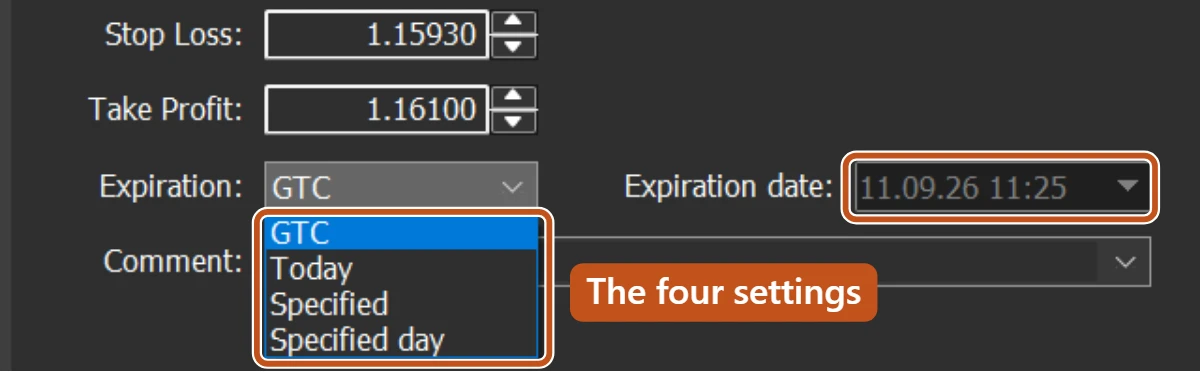
The Expiration field on a Limit, Stop or Stop Limit ticket is a drop-down with four choices. Beside it sits Expiration date, where the two Specified settings take their date. The clock it uses is the broker's server time, shown in the Market Watch title bar, not the clock on your wall.
| Setting | The order is deleted | Use it when |
|---|---|---|
| GTC | Never, until it fills or you delete it (Good till cancelled) | You genuinely want it alive for days and will check it daily |
| Today | At the end of the current trading day, server time | The setup is for this session only |
| Specified | At the exact date and time you type | You know the moment it stops making sense, such as before a release |
| Specified day | At the end of the day you pick | The idea is good until Thursday's close, say, and no longer |
Some brokers do not offer every setting on every symbol. The Expiration line in the Specification window lists which ones a symbol accepts. If a choice is missing from your drop-down, that is why.
The weekend mistake
Forex closes on Friday evening and reopens on Sunday evening, server time. Nothing trades in between, but the world does not stop. An election result, a central bank statement, a war. When the market reopens it does not walk from Friday's price to Sunday's. It jumps.
A Buy Stop left alive over a weekend
- On Friday you place a Buy Stop on GBP/USD at 1.27050 with a Stop Loss at 1.26750, a planned risk of 30 pips. Expiration is GTC. Price closes at 1.26900.
- Over the weekend there is news. On Sunday evening the first Ask is 1.27400. Your stop level was passed without a single price in between.
- The order fires as a market buy and fills at 1.27400. Your Stop Loss is still at 1.26750, now 65 pips away.
- On 0.10 lots that is a risk of about 65 dollars instead of the 30 dollars you planned, more than double, before you have even looked at a chart.
The order did exactly what it was told. It was the instruction that was out of date.

Anything left alive over a weekend is a trade you have agreed to take at a price you have not seen. If the setup is still valid on Monday, placing it again takes two minutes. If it is not valid, it should not be on the server.
Trading carries risk and you can lose money.
A Friday routine
- Open the Toolbox Trade tab and look below your positions. Every pending order is listed there with its type and price.
- For each one, ask whether you would place it fresh on Sunday night without looking. If not, right-click the row and choose Delete, or double-click it and press Delete in the modify window.
- For any order you place during the week, pick Today or Specified as a matter of habit, and reach for GTC only when you have a reason.
- Look at open positions too. A stop loss is not an expiry, and a position also crosses the gap. That is a Module 11 topic, but the Friday question is the same.
Two minutes on Friday is cheaper than any gap. The Trade tab is the whole checklist.
The picture to keep
A pending order is a note left with the shopkeeper. Leave it over the weekend and he opens on Monday with new prices chalked up, reads your note, and does exactly what it says.