
Practical tips and tricks

None of this is clever. It is the small stuff that separates a trader who works the platform from one the platform works. Learn the keys, keep a desk for each session, and never trade a symbol whose specification you have not read.
The keys worth knowing by heart
Every one of these opens something you have used in this module, and every one of them is faster than the menu. Learn the first seven this week; the last one is a bonus.
| Key | What it does |
|---|---|
| F9 | New Order ticket for the active chart, stop loss and take profit fields included |
| F10 | A small always-on-top window of live prices for your Market Watch symbols, useful while another window covers the charts |
| Ctrl+T | Shows or hides the Toolbox: Trade, History, Alerts and the rest |
| Ctrl+M | Shows or hides Market Watch, where symbols and their Specification live |
| Ctrl+N | Shows or hides the Navigator: accounts, indicators and programs |
| F8 | Properties of the active chart, colours and what is shown |
| F11 | Full screen chart, and F11 again to come back |
| Ctrl+F | Crosshair, for measuring the distance between two prices in points and candles |
The crosshair measure is the fastest way to check a stop distance before you type it. Click at the entry, drag to the stop, and the figure beside the cursor shows the points between them. On a five-digit pair, divide by ten for pips.
A desk for each session
Lesson 7 showed you how to save a profile from File, Profiles, Save As. Use it properly: one profile per session you actually trade, each holding only that session's pairs and timeframes, and a separate Review profile with daily charts and nothing else. Clicking the profile name in the status bar switches between them in a second. Templates carry the look of one chart; save one called Default so every new chart starts clean, and one per plan if your plans need different indicators.
- Name profiles by session, London, New York, Review, not by mood or by date.
- Save the profile again after any change you want to keep. MT5 also saves the current one on exit, so a mess left on Friday is the desk you find on Monday.
- Keep the One Click Trading panel folded in every profile, and check Tools, Options, Trade after switching accounts.
Read the Specification before the first trade on any symbol
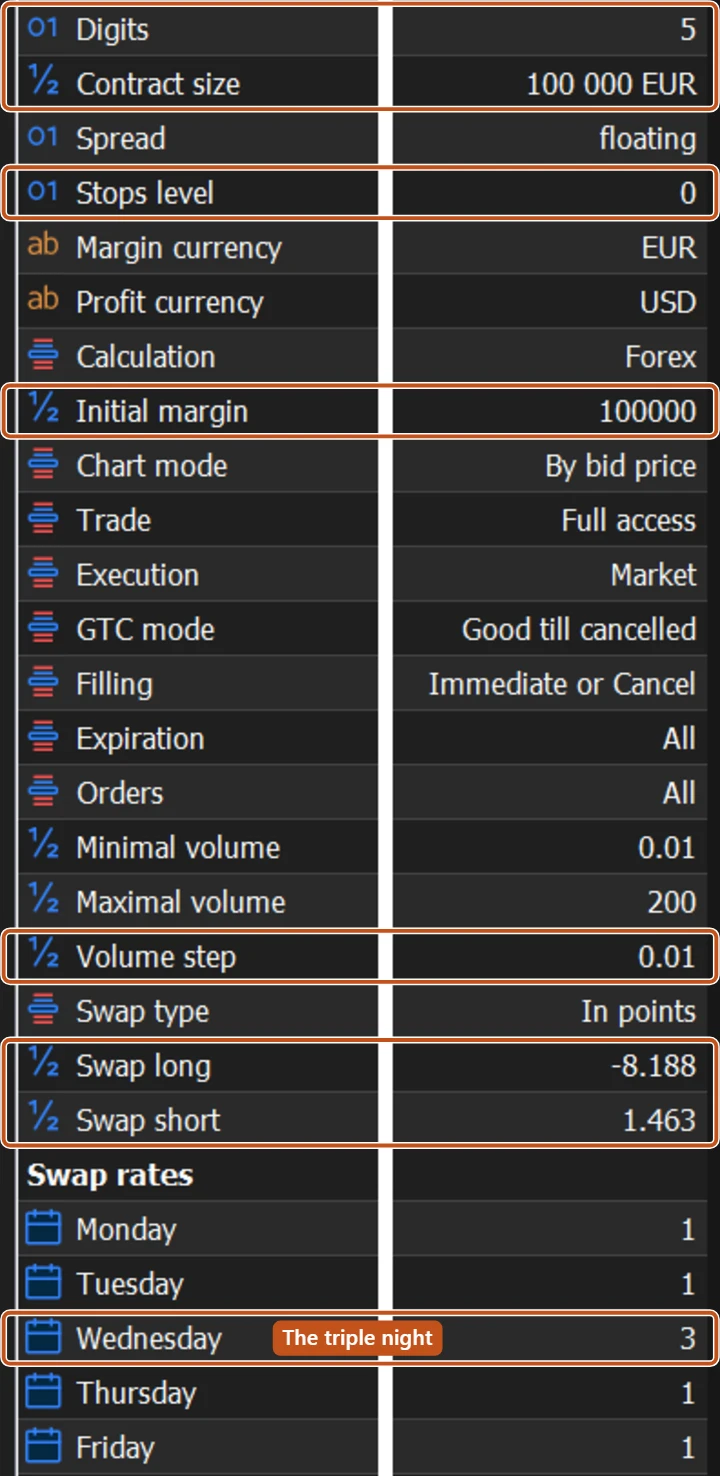
Open Market Watch with Ctrl+M, right-click the symbol and choose Specification. A window lists everything the broker has decided about that symbol. The fields below are the ones that change what a trade costs and whether an order is accepted at all.
| Field | What it means for you |
|---|---|
| Contract size | Units in one lot. 100,000 on most currency pairs, 100 ounces on a typical gold symbol, 1 on many crypto symbols. This decides what a pip or a point is worth. |
| Digits | Five on most pairs, three on JPY pairs. Either way, ten points make a pip. |
| Stops level | The minimum distance in points that a stop, target or pending order must sit from the current price. Inside it, MT5 answers Invalid S/L or T/P. |
| Minimal volume, Maximal volume, Volume step | The smallest and largest size you can send, and the step between sizes. A partial close has to land on the step. |
| Initial margin, and the Margin rates table at the bottom | What the broker locks to open and to keep a position. Margin currency tells you which currency that is quoted in. |
| Swap long, Swap short | The nightly charge or credit for holding a buy or a sell. Swap type says whether it is in points, in account currency, or a percentage. |
| Swap rates | A line for each weekday under the swaps. The day marked 3 is when three nights are charged at once: usually Wednesday on forex, and Friday on some index symbols. |
| Sessions | The Quotes and Trade hours for each day, in server time. Outside the Trade hours your order is refused. |
A gold symbol, read before trading it
- Contract size 100, Digits 2, so one lot moves 1 dollar per point and 0.10 lots moves 10 cents per point.
- Stops level 30 points. A stop closer than 30 points to price is refused, so your tight stop needs to be at least that far.
- Swap long minus 8 dollars per lot per night. Holding 0.10 lots of a buy for five ordinary nights costs 8 times 0.10 times 5, which is 4 dollars, before any move in price.
- Swap rates show 3 against Wednesday. Hold that same 0.10 lots across Wednesday night and that single night costs 2.40 dollars.
None of that is on the chart. All of it is in the Specification window, two clicks from Market Watch, and all of it changes the arithmetic of a trade you were about to size from the chart alone.

Every symbol carries its own rules, and the broker wrote them down for you. Trading a symbol without reading its specification is signing a contract without turning the page over.
Trading carries risk and you can lose money.
The picture to keep
A gateman who knows the compound, which gate sticks, which visitor comes at which hour, and what the landlord's rules say for each house, keeps it safe without ever raising his voice. That is what platform fluency is: nothing dramatic, nothing left to chance.