
Stop loss and take profit, set at entry, every single time

Module 10 taught you how to place an order. This module is about what happens after the fill, when the trade is live and your money is on the table. We start with the two lines that decide how a trade ends before it has even begun.
Two lines that end the trade for you
A stop loss is an instruction to close the position at a loss once price reaches a level you chose. A take profit is the same instruction pointed the other way: close at a gain once price reaches a level you chose. On MT5 both are stored on the broker's server the moment the order is accepted, which means they keep working when your laptop is off, your data has finished, or NEPA has taken the light.
That last point matters more than it sounds. Later in this module you will meet a tool, the trailing stop, that does not survive a closed terminal. The plain stop loss and take profit do. They are the two protections you can actually rely on when you are not looking.
Which price triggers them: for a buy position, the stop loss and take profit both fire on the Bid. For a sell position, both fire on the Ask. The spread lives in that gap, and it is why the chart line and the fill can differ by a pip or two.
Setting both on the order ticket
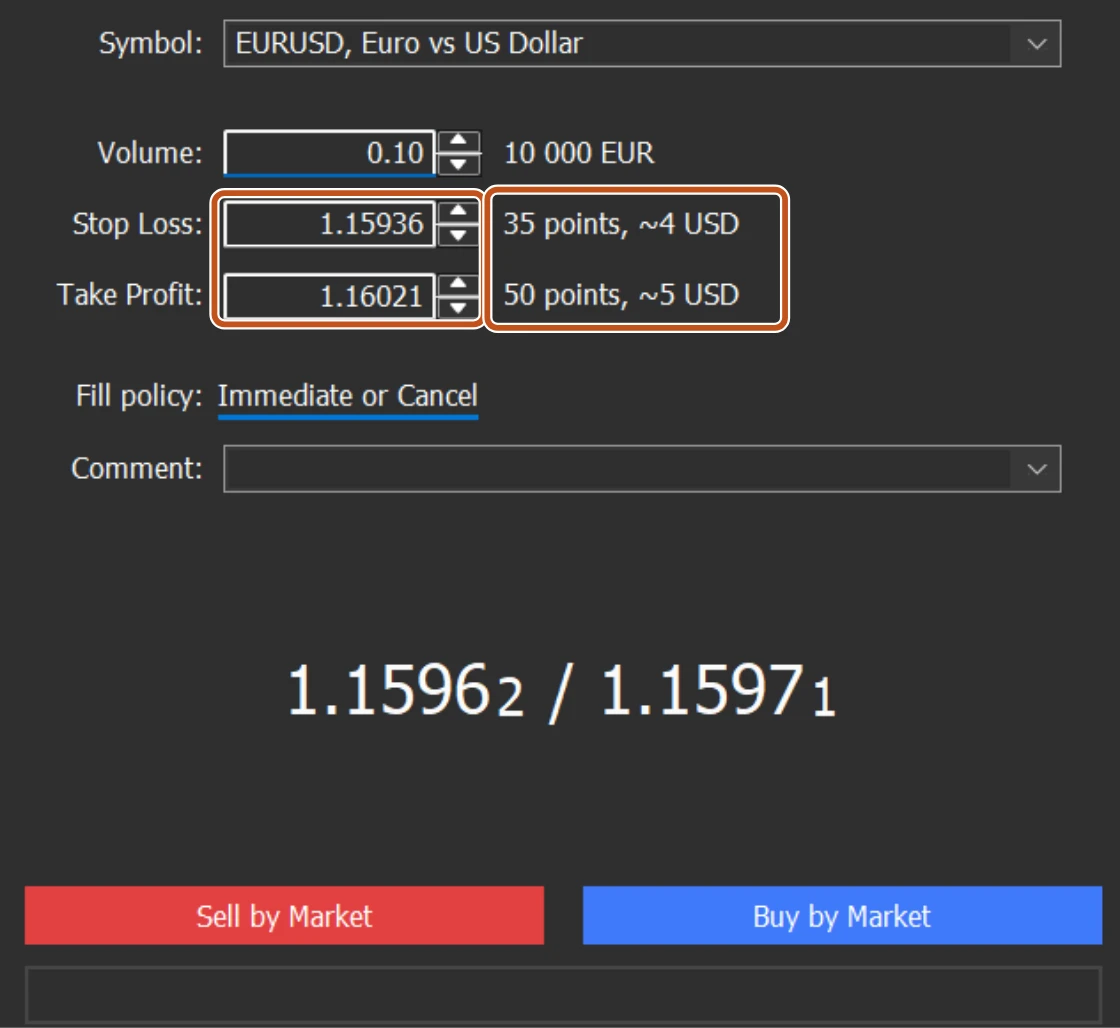
Press F9, or right-click the chart and choose Trading, New Order. The ticket has the fields you met in Module 10: the order kinds down the left, then Symbol, Volume, and Stop Loss and Take Profit as two price boxes with small up and down arrows beside them. Beside each box MT5 shows the distance from the current price in points and roughly what it is worth in money.
- Type the exact price into Stop Loss. For a buy it must sit below the current Bid; for a sell it must sit above the current Ask.
- Type the exact price into Take Profit. Buy above, sell below.
- Check the distance from entry in pips before you click. The ticket does not show it for you, so read the two prices side by side.
- Click the Buy or Sell button. If MT5 answers Invalid S/L or T/P, your level is inside the broker's stops level, the minimum distance from the current price. Move it further out, and check the error messages lesson if it keeps happening.
Trading carries risk and you can lose money.
Adding or changing them on a live position
Open the Toolbox with Ctrl+T and look at the Trade tab. Every open position is a row, with columns for S/L and T/P. If either shows nothing, the position is unprotected.
| Route | What you do |
|---|---|
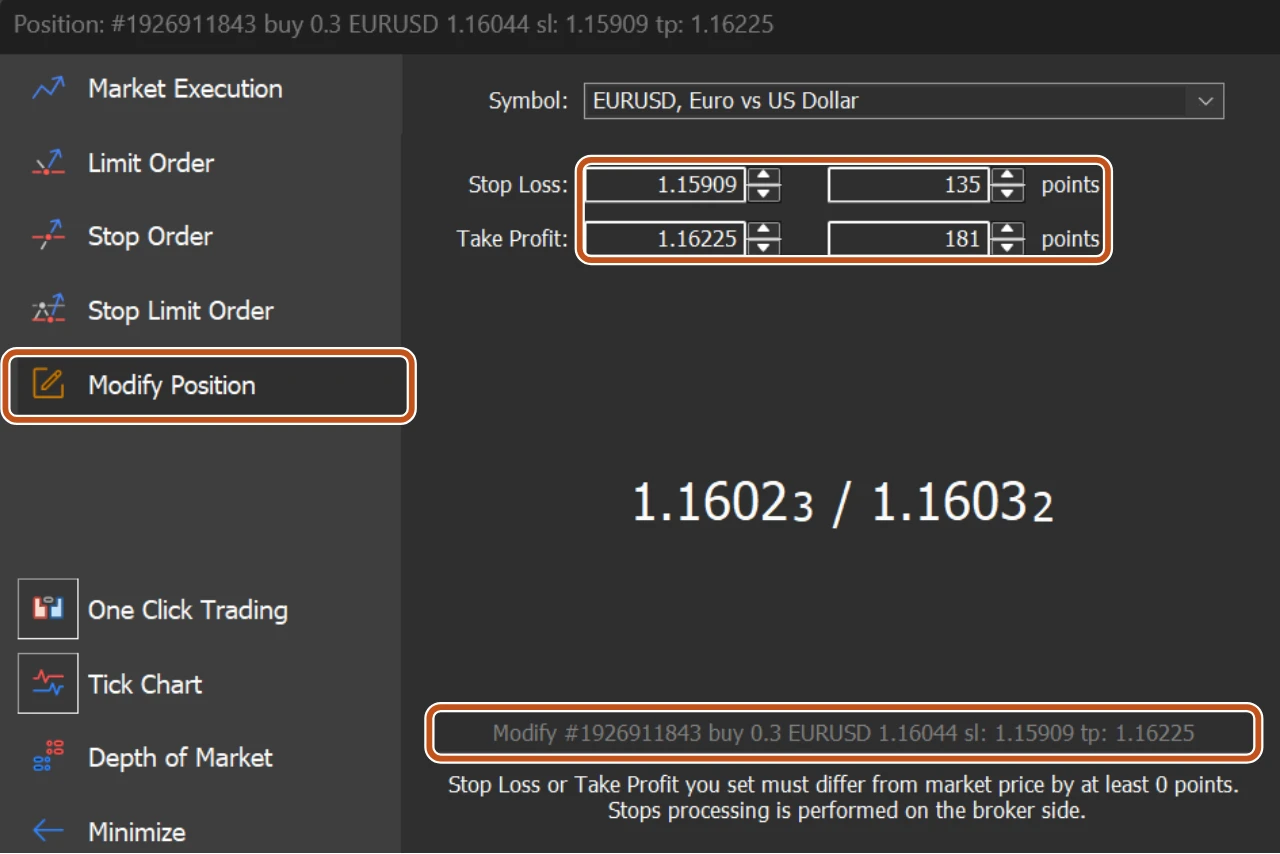
| Right-click the row, Modify or Delete | The order window opens with a fifth entry in its list, Modify Position, selected. Stop Loss and Take Profit each have a price box and a points box; type into either. Then click the long button that repeats them back to you, for example Modify #1234567 buy 0.10 EURUSD sl: 1.08200 tp: 1.09100. It stays grey until you change a value. |
| Double-click the row | Same window, same fields. |
| Drag the line on the chart | With Tools, Options, Charts, Show trade levels ticked, the S/L and T/P appear as dashed lines. Drag one to a new price and the position is modified on the server. Ticking Use 'Alt' key to drag trade levels stops an accidental mouse slip from moving your stop. |
Why at entry, and not five minutes later
Every trader who has lost a large amount on one trade knows the sentence. I will set the stop once I see how it goes. It goes badly, the loss grows, and the stop that would have cost a small amount now feels impossible to accept. Setting it later is how it never gets set.
A trade with its ending written in
- You buy EURUSD at 1.08500 with 0.01 lots, planned on a 500,000 naira account risking 1 percent, which is 5,000 naira.
- At roughly 160 naira per pip on 0.01 lots, 5,000 naira of risk buys you a 30 pip stop, so Stop Loss goes at 1.08200.
- Your plan asks for two units of reward per unit of risk, so Take Profit goes 60 pips away at 1.09100.
- Both are typed on the ticket. The trade now has three possible endings, and you chose all three before clicking.
The size came from the stop distance, not the other way round. That is the position sizing rule from Part One applied on the actual ticket.

Decide the exit before the entry. A stop set after the trade opens is set by a person who is already hoping, and hope moves stops in exactly the wrong direction.
Trading carries risk and you can lose money.
The picture to keep
The stop loss and take profit are a gateman with written instructions who stays on duty all night. He does not need you awake to do his job, because the instructions live at the gate, not in your pocket.