
The trailing stop on MT5, and the trap inside it

The trailing stop is a genuinely useful tool, and it has burnt more careful people than almost any other button on the platform. Not because it is broken. Because of one fact about where it runs that nobody reads until it costs them.
What a trailing stop does
Picture a security guard walking behind you. Every step you take forward, he takes one too. But he refuses to let you walk backwards more than a fixed number of steps. Move ahead ten steps, he moves ahead ten. Turn round and walk back, he plants his feet at the line and the walk is over.
That is a trailing stop. You choose a distance in points. Once the position is in profit by at least that distance, MT5 places a stop loss that many points behind the current price. Each time price moves further in your favour, the stop is moved up behind it. When price comes back, the stop stays exactly where it was. It only ever moves one way.
Setting it on MT5
- Open the Toolbox with Ctrl+T and go to the Trade tab.
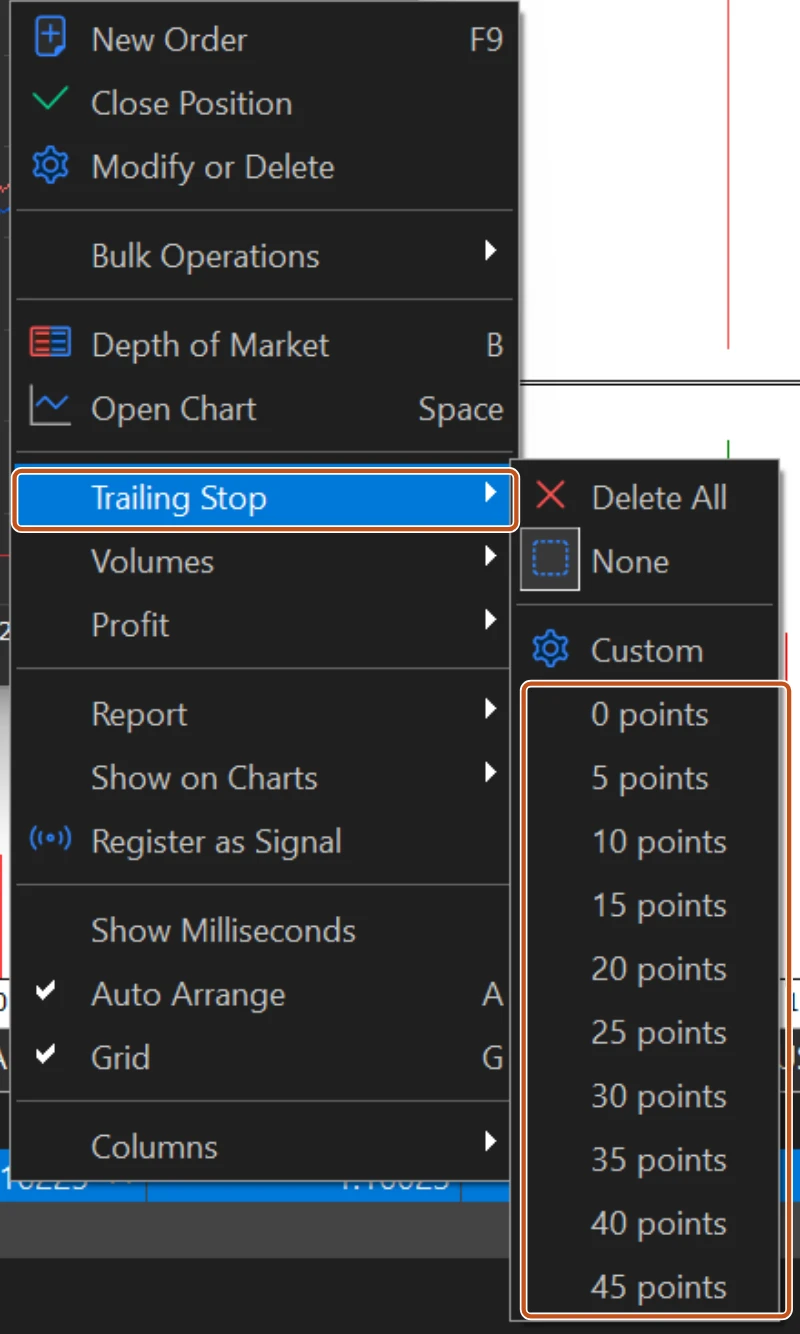
- Right-click the open position and hover over Trailing Stop.
- Pick a distance from the list of point values, or choose Custom and type your own. Choose None to remove the trailing stop from that position, or Delete All to remove it from every position at once.
- Nothing visible happens yet. The stop loss line only appears, or moves, once price has travelled that many points in your favour.
The list is in points, not pips. On a five-digit pair such as EURUSD, ten points make one pip. On the terminal pictured below the list runs from 0 to 45 points, which is 4.5 pips at most; anything wider goes in Custom. Type 150 there and you have a 15 pip trail. Pick 15 from the list, thinking in pips, and you have a 1.5 pip trail that normal noise will hit in seconds, if the broker's stops level even allows it.
| Points chosen | Pips on a five-digit pair | Pips on a three-digit JPY pair |
|---|---|---|
| 50 | 5 | 5 |
| 150 | 15 | 15 |
| 300 | 30 | 30 |
Set a plain stop loss first, every time. The trailing stop only moves a stop that is already in profit. Until price has moved your chosen distance, the only thing protecting the trade is the ordinary stop from lesson 1.
The trap: the guard goes home when you close the office
The stop loss and take profit live on the broker's server. The trailing stop does not. It runs inside your MetaTrader 5 terminal, on your laptop, and MetaQuotes says so plainly in the platform's own documentation: the trailing stop works in the client terminal, not on the server, so it does not work when the terminal is closed.
Close the laptop lid. Let Windows restart for an update. Lose your data for an hour. Let the machine sleep. In every one of those cases the trailing stop stops trailing. The last stop loss it placed stays on the server, which is good, but from that moment it is a fixed stop. Price can run fifty pips in your favour and all the way back to that old level, and the guard who was supposed to follow you is at home asleep.

The built-in trailing stop only works while your terminal is open and connected. The moment the lid closes, the guard has gone home. Anyone who tells you their laptop trailing stop protected them overnight was protected by the last fixed stop it left behind, and by luck.
| Protection | Survives a closed or disconnected terminal? |
|---|---|
| Stop loss | Yes, it lives on the broker's server |
| Take profit | Yes, it lives on the broker's server |
| Pending order | Yes, it lives on the broker's server |
| Trailing stop | No, it runs in your terminal |
| Price alerts | No, they run in your terminal |
| Any program attached to a chart | No, it runs in your terminal |
Using it without getting burnt
- Use the trailing stop only while you are at the screen, and remove it, or accept it as a fixed stop, before you walk away.
- If you want trailing while you sleep, the terminal must stay open and connected somewhere, which is what a VPS is for. Even then, a VPS reboot still stops it.
- Choose the distance from the symbol's normal movement, not from a round number. A trail tighter than the average swing on your timeframe is just an early exit with extra steps.
- Check your journal for trailed trades that closed on a pullback and then went on to the target. That is the cost of the tool, and it is real.
The picture to keep
A trailing stop is a security guard who follows you forward and refuses to let you walk back more than a fixed number of steps. Useful. But he goes home when you close the office, which is exactly why a trailing stop that lives only on your laptop is not protecting you overnight.
How HustlCraft applies this
HustlCraft Shield: Shield's protection is enforced on the server side, so it does not switch off when the laptop lid closes, which is the exact gap the built-in trailing stop leaves open. Read about HustlCraft Shield.