
Price alerts instead of screen-staring

Staring at a chart for six hours does not make you a better trader. It makes you a tired one who takes a trade out of boredom. Let the terminal do the watching, and keep the deciding for yourself.
Why alerts beat watching
Your plan says you act when price reaches a level. Between now and then there is nothing to do, and a person watching a chart with nothing to do will invent something. An alert turns that waiting into a sound or a phone buzz, and you come back to the screen only when the level has actually been reached.
It is the difference between a gateman who calls you when the visitor arrives and one who makes you sit at the gate all day in case someone comes.
Setting an alert on MT5
- Open the Toolbox with Ctrl+T and click the Alerts tab.
- Right-click inside the tab and choose Create.
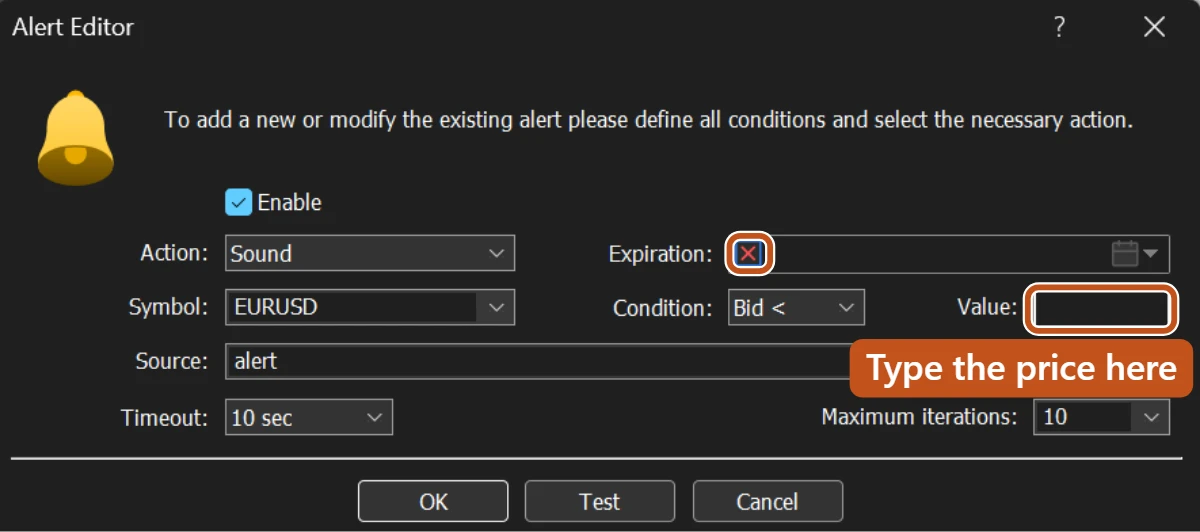
- Tick Enable. In Action, pick Sound to play a sound on this computer, or Notification to push a message to the MT5 app on your phone.
- Set the Symbol, then the Condition: Bid greater than, Bid less than, Ask greater than, Ask less than, or Time equals.
- Type the price into Value. For a level you want to buy above, use Ask greater than. For a level you want to sell below, use Bid less than.
- Leave Timeout and Maximum iterations at their defaults unless you want the alert to repeat. Tick Expiration and set a date so old alerts do not fire weeks later.
- Click OK. The alert now sits in the list, and you can right-click it later to Modify, Disable or Delete.
Phone notifications need one extra step. Open the MT5 app on your phone, find your MetaQuotes ID in its settings, then on the desktop go to Tools, Options, Notifications, tick Enable Push Notifications, and type that ID in. Use the Test button once to prove it reaches the phone.
An alert is not an order
| Price alert | Pending order | |
|---|---|---|
| What happens at the level | You are told | The trade is placed |
| Where it lives | Your terminal | The broker's server |
| Works with the terminal closed? | No | Yes |
| Who decides | You, when you hear it | Nobody, it just fills |
That second row is the same trap you met with the trailing stop. Alerts run inside your terminal. A closed laptop sends no sound and no push. If a level needs to be acted on while you sleep, the honest tool is a pending order from Module 10 with its stop and target attached, not an alert you will never hear.
Push notifications also depend on your phone having data and MT5 allowed to notify. Test the chain once on a quiet day rather than discovering a broken link on a busy one.
Habits that make alerts useful
- Set alerts at the levels written in your plan during the weekly review, not in the middle of a session.
- Set two per level: one a few pips before it, so you are back at the screen with time to think, and one at it.
- When an alert fires, open the plan first, then the chart. The alert says the level was reached, not that the setup is valid.
- Delete every alert that has fired or expired on the same day. A list of dead alerts hides the live ones.

An alert that fires is an invitation to check your plan, not a signal to trade. Price reaching a level is the start of the question, not the answer to it.
The picture to keep
A gateman who phones you when the visitor arrives lets you get on with your day. But he only phones while he is on duty, and this gateman goes home when the terminal closes.