
The One Click Trading panel, and why to be careful with it

One click. No ticket, no confirmation, no second look. Speed is the whole point of this panel, and speed is also the reason so many of the worst trades in a history tab were placed with it.
What the panel is
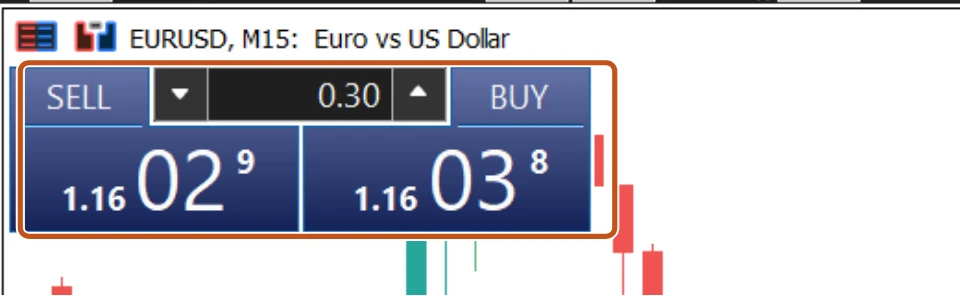
Press Alt+T on a chart, or right-click it and choose One Click Trading, and a panel appears in its top-left corner: a Sell button over the Bid, a Buy button over the Ask, and a volume box between them. Click Sell and a market order for that volume is sent at once. No ticket appears. The same buttons appear in the Trading tab of the Market Watch window for every symbol in your list.
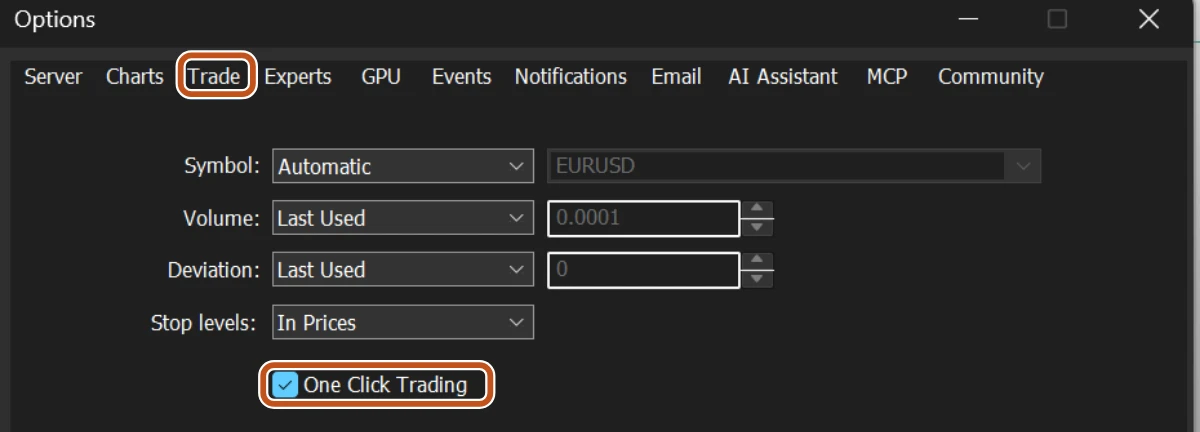
The panel is switched off on a fresh install. To turn it on, go to Tools, Options, open the Trade tab, and tick One Click Trading. MT5 shows a disclaimer explaining that orders will be sent without confirmation, and asks you to accept it. Read it. It is one of the few disclaimers in trading that says exactly what happens next.
What it switches off
The same setting changes two other things that are easy to miss. First, the X at the end of a position row in the Toolbox Trade tab now closes the position immediately, with no window. Second, clicking a Close button anywhere in the platform behaves the same way. The setting is not just a fast entry. It is a fast everything.
| Order ticket (F9) | One-click panel |
|---|---|
| Stop loss and take profit typed before the order is sent | No stop loss or take profit. The position opens naked and you add them afterwards |
| Volume typed and read back on the button | Volume is whatever is in the small box, which remembers the last value you used |
| Buy and Sell are separate, labelled buttons on a window you opened on purpose | Two buttons a centimetre apart on a chart you were only looking at |
| A wrong click costs you a moment | A wrong click costs you a live position |
The first row is the one that matters. Lesson 1 asked you to set the stop at entry, every time. The one-click panel makes that impossible, because there is no place to type it. Every one-click trade starts as an unprotected position, and the stop gets added by a person who now has a live position and a reason to hurry.
Three ways people get hurt
- The wrong size. The volume box holds the last value used. A 1.00 left over from a demo experiment sends a full lot on a live account where the plan said 0.10.
- The wrong direction. Sell is on the left, Buy on the right. A hand resting on the mouse during a fast move has clicked the wrong one more times than anyone admits in public.
- The naked position. Price spikes the moment you are typing the stop into the Modify window, and the loss is already bigger than the plan allowed.

A button that skips the ticket also skips the moment where you check yourself. Fast hands and no stop is not a trading style. It is how a good week becomes a bad month in an afternoon.
If you use it anyway
- In Tools, Options, Trade, set Volume by default to a fixed value, your smallest planned size, rather than Last used.
- Keep the panel folded shut on every chart you are not actively trading. Alt+T, or the same right-click entry, closes it again.
- Have the Modify window open in your head before you click: the stop price is already decided, and it goes in within seconds, not once you see how it goes.
- Leave One Click Trading switched off on any account you are not sitting in front of with a written plan for that session.
A useful test: if the trade cannot wait the ten seconds an order ticket takes, ask what edge you think you have that disappears in ten seconds. Usually the answer is none, and the hurry is the feeling, not the setup.
The picture to keep
The one-click panel is a gate with no gateman. It opens for anyone, instantly, including the version of you that is angry about the last trade.